Review rule violations and fix issues using quick fix suggestions
The Rule violation details page appears when you click a rule violation on the All accessibility rules dashboard area or select a Suggested fixes recommendation.
Failed rules represent confirmed failures on your pages and incomplete rules need further review by you to determine if they are true failures. You can use the interactive filtering options on the page to only show the issues within failure categories that interest you.
| The Suggested fixes section takes a lot of the guesswork out of filtering the most impactful issues to resolve. |
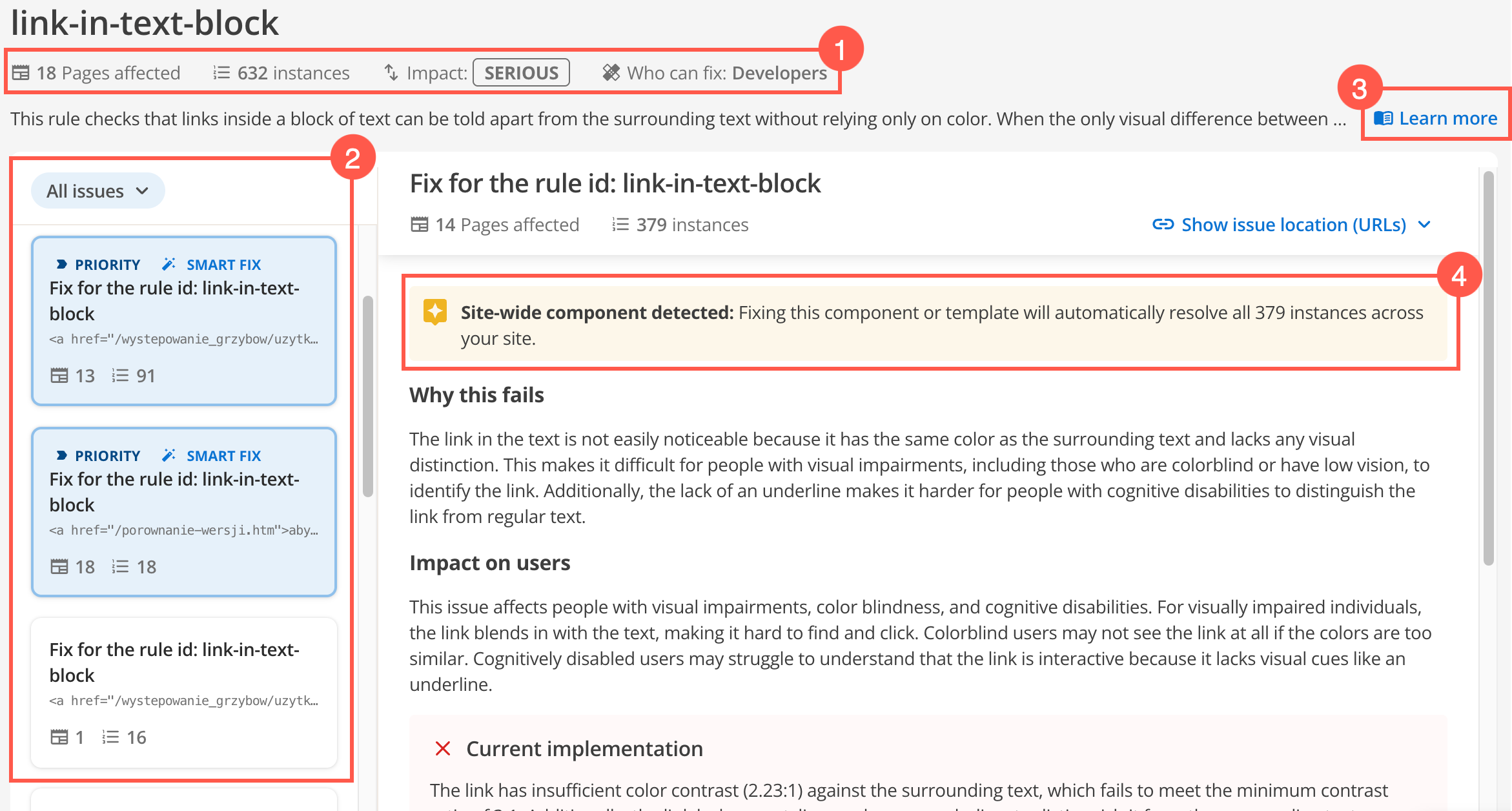
-
This key information outlines the impact from different data points and perspectives.
-
The Instances data point tells you how many times this rule has been violated across your site.
-
The Who can fix data point is a suggestion based on whether the fix was evaluated as a code or content fix.
-
-
Addressing priority smart fixes first will give you the biggest returns for accessibility compliance.
-
Use the All issues filter options to filter based on recurring and priority issues:
- Priority
-
High-severity accessibility issues that should be addressed as soon as possible.
- Recurring
-
Filters issues affecting more than 10% of pages that require broader fixes.
-
The Show issue location (URLs) button shows where the violations occur so you can edit the page and correct the issue on your website.
-
-
Click Learn more to read the compliance guidelines from the applicable WCAG specification.
-
Click Show issue location (URLs) to show an expanded list of Page title, URLs, and Instance counts for the rule violation. Adjust the rows per page to view more URLs.
-
This banner appears if a fix was detected as a site-wide component such as a common menu navigation, header, or footer.
Compare the volume of Issue Locations with this alert banner to determine whether resolving this issue might offer a one-to-many quick fix. Because these website components are often reused all over a site design, these fixes are given additional weighting in rule violation results.
-
An AI-generated fix for the priority violation is provided for your consideration for High priority rule violations (smart fix).
High priority rule violations (smart fix)
Smart fixes are generated automatically when a priority issue is identified to help reduce visual noise in the violation results.
Addressing priority smart fixes first will give you the biggest returns for accessibility compliance.
-
Click the tile for the Priority Smart Fix rule violation.
-
Review the Recommended fix section to check if the fix meets the needs of your site.
-
Use the Show issue location (URLs) button to show the affected page URLs.
-
Load each page and fix the issue on your website.
Low priority rule violations (no smart fix)
If you want to see a smart fix suggestion for non-priority issues, you can generate them on-demand.
-
Click the white tile for the rule violation.
-
Click Generate smart fix and wait for a solution to be created.
-
Review the Recommended fix section to check if the fix meets the needs of your site.
-
Use the Show issue location (URLs) button to show the affected page URLs.
-
Load each page and fix the issue on your website.