Creating anonymous profiles from marketing IDs
This guide explains how to create and track anonymous customer profiles in the Squiz Customer Data Platform (CDP) using marketing identifiers (such as UTM parameters or platform-specific URL formats). These profiles support personalization before sign-in, progressive profiling, and campaign attribution tracking.
Overview
Anonymous tracking measures website engagement and monitors visitor behavior without requiring a sign-in, building persistent profiles that follow users across sessions and devices.
Purposes:
- Unified profiles
-
Connects anonymous activity across sessions and devices.
- Personalization before sign-in
-
Provides more targeted and more granular information before a visitor logs in.
- Analytics integration
-
Integrates with analytics tools such as Power BI and Tableau.
The CDP uses marketing identifiers (UTM tag or platform-specific IDs) to create and update anonymous profiles from campaigns or referrals before a visitor signs in.
Supported platforms
The CDP supports anonymous profile creation from a wide range of marketing platforms.
The list below represents common and officially supported integrations, but is not exhaustive:
| Platform | Identifier method | Example |
|---|---|---|
HubSpot |
Query parameter ( |
|
Mailchimp |
User-defined query parameter |
Configured per account |
Triple Whale |
Query parameter ( |
|
Klaviyo |
Query parameter ( |
|
Swift Digital |
URL path extraction |
|
How anonymous profile tracking works (at a glance)
-
Visitor arrives through a campaign link and the marketing ID is captured (from query parameters or the URL path, depending on the platform).
-
CDP creates an anonymous profile and stores page view behavior.
-
Consent is required before tracking.
-
For users who land on the site and then accept the cookie consent, tracking will still occur on the second page view, when the referral URL is evaluated.
-
-
Profiles are updated as the visitor interacts with the site.
-
Page views: Up to 100 of the latest pages are displayed on the CDP Single Customer Profile page.
-
Forms: A CDP event is created to map form submission answers to the customer profile.
-
-
Profiles are used for personalization and segmentation.
| Some platforms, such as Swift Digital, require a second page view before profile creation occurs. For details, see Profile activation. |
Use cases
- Progressive profiling
-
Tracks visitor engagement and updates profiles over time.
When users later sign in or submit forms, their anonymous data merges into the Single Customer View (SCV).
- Multi-channel campaign tracking
-
Assigns profiles with the same identifier to multiple campaign channels (for example, email, social, paid ads) to track cross-channel behavior.
- Marketing attribution and segmentation
-
-
Measures engagement and builds segments based on anonymous behavior.
-
Attributes form submissions and other actions to specific campaigns using the unique marketing identifier.
-
How to set up anonymous profile tracking
Anonymous customer profiles have
-
two technical prerequisites:
-
one social prerequisite:
-
End-user consent; and
-
-
one administrative prerequisite:
SCV schema updates
Extend the Single Customer View (SCV) schema in the Squiz DXP CLI.
Add fields for storing UTM parameters:
utm_campaign maps to the channels attribute (array)
Additional attributes can be added as needed to capture more UTM tag values against the profile in SCV.
Marketing platform identifiers
Campaign links contain marketing identifiers (unique user IDs) passed from emails or social media feeds. Most platforms use query parameters, while some (such as Swift Digital) embed identifiers in the URL path.
For a complete list of supported platforms and identifier methods, see Supported platforms.
End-user consent
-
Tracking values are stored only after cookie consent is granted.
-
Global site consent must be configured.
-
Use the content banner component for collecting cookie consent.
-
See the Content banner simple component documentation.
-
-
Or add the cookie value to the existing cookie consent collection.
-
Consent cookie example:
`squiz.cdp.consent`: `{"CDPConsent":1,"documentVersion":"1.0"}`
-
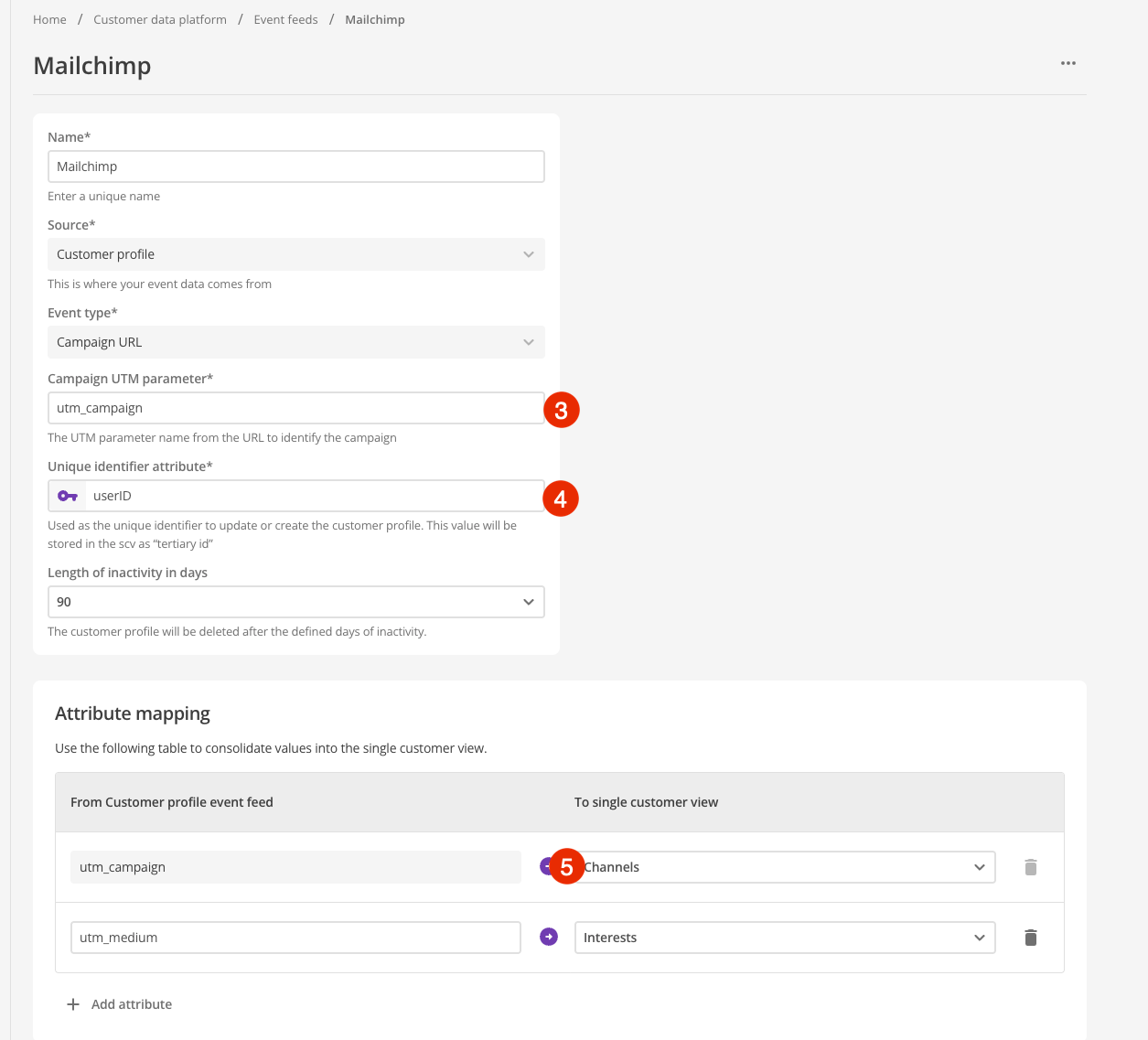
Creating a campaign customer profile event feed
-
Navigate to .
-
Click Create Event Feed and select
Customer Profile Event Feed.For Swift Digital campaigns, select Campaign URL (SwiftDigital)instead. See Configuring a Swift Digital event feed. -
In your marketing platform, configure
Campaign UTM Parameter:-
Specify the URL query parameter to monitor (for example,
utm_campaign).
-
-
In your marketing platform, configure the
Unique Identifier Attributefield:-
Maps the marketing ID to the profile for creation and updates.
-
-
Map the parameter from the campaign to the
channelsattribute (for example,utm_campaign). -
Click Save and confirm success.
Retention settings
-
Profiles expire after inactivity: 60, 90, or 180 days.
-
Clicking another campaign link within the retention period extends the profile’s life.
These retention settings apply to all marketing platform profiles, including Swift Digital.
Viewing profiles from the CDP single customer view
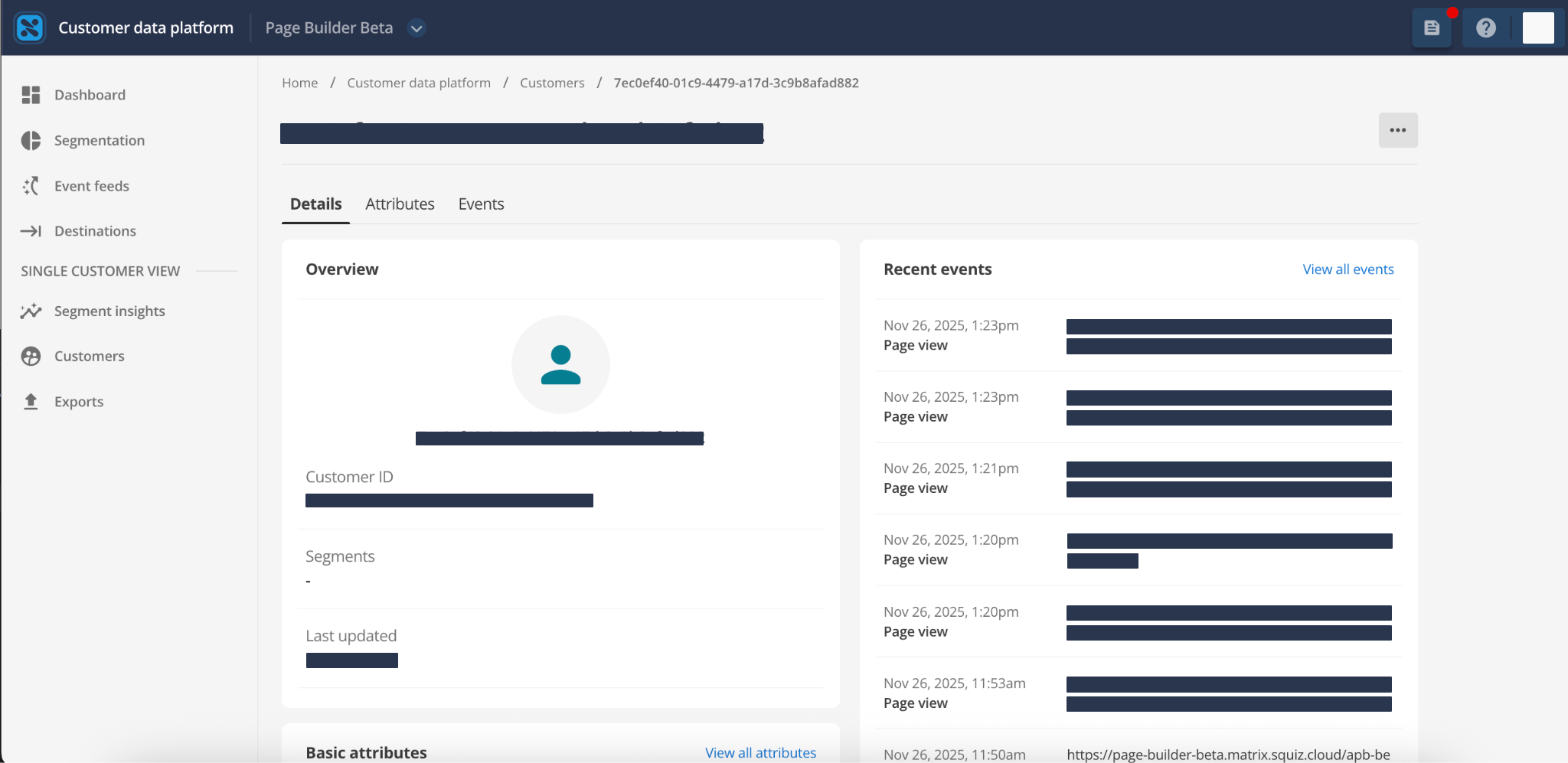
-
The Profile Details page contains the unique identifier generated from the marketing redirect link configured in the event feed.
-
The Attributes tab shows tracked attributes.
-
The Recent Events section shows up to 100 page-view events in the Customer Details interface.
Each log includes the following details:
-
Date.
-
Timestamp.
-
Event type.
-
URL.
If necessary, this is presented truncated with ellipses. The full URL always displays on the Events tab.
-
Technical reference
Privacy and validation
The privacy of anonymous profiles can be maintained using Campaign types in the SCV and anonymous profiles can be validated using Identifier character length validation.
Campaign types in the SCV
Profiles created using the Place the Page Belongs To event feed are assigned a Campaign User type in the Single Customer View (SCV).
Using the Campaign User type ensures the following:
- Separate from known user profiles
-
Campaign Users are anonymous or unverified and are not blended into the standard known user records.
- Controlled tracking
-
This separation ensures unverified profiles are tracked and updated progressively without affecting the integrity of verified customer data.
- Other benefits
-
-
Supports personalization before login and multi-channel campaign tracking.
-
Maintains separate SCV data for known users.
-
Supports progressive profiling, so these Campaign Users merge with known profiles once verification occurs (for example, form submission or sign-in).
-
Assigning anonymous profiles to the Campaign User type provides personalization and analytics while maintaining data accuracy for the site and privacy for verified customers.
This applies to all marketing platform profiles, including Swift Digital.
Identifier character length validation
If the DXP knows the campaign type, validation is enforced, and a profile is established only if validation passes.
Strict character length validation is implemented for known campaign types:
| Campaign Type | Required Character Length |
|---|---|
HubSpot contact identifier |
Exactly 100 characters |
Klaviyo specific (KX) contact identifier |
Exactly 73 characters |
Triple Whale (TW) contact identifier |
Exactly 26 characters |
Swift Digital contact identifier |
Not applicable (see Swift Digital campaigns) |
Identifier character length validation ensures only valid campaign IDs create profiles, maintaining data accuracy and protection against query string brute force attacks.
Squiz continues to add more validations as new marketing platform integrations and use cases are supported.
Platform-specific configurations
Some marketing platforms require specific configuration due to non-standard identifier formats or unique requirements. This section provides detailed setup instructions for platforms that do not follow the standard query parameter approach.
Swift Digital campaigns
Swift Digital uses a non-standard URL format that differs from other marketing platforms. Instead of passing identifiers through query parameters, Swift Digital embeds user identifiers directly in the URL path using a custom separator pattern.
URL structure
Swift Digital campaign URLs use four z characters (zzzz) as delimiters between data fields.
The URL follows this pattern:
https://[domain-url]/link/id/zzzz[content-id]zzzz[user-identifier]/page.html?[utm-variables]The CDP parses this URL structure to extract:
- Content ID
-
A pattern consistent across multiple links within a campaign.
- User identifier
-
A unique alphanumeric string for each recipient (for example,
6858942c4f803768). - Target landing page
-
The destination HTML page.
- UTM variables
-
Campaign parameters such as
utm_campaign=smart-campaign.
Configuring a Swift Digital event feed
-
Navigate to .
-
Click Create Event Feed and select
Campaign URL (SwiftDigital). -
The unique identifier attribute is fixed as
(user_id)for this campaign type. -
Configure the UTM campaign parameter to capture (for example,
utm_campaign). -
Click Save and confirm success.
Data storage
When the CDP processes a Swift Digital campaign URL:
- Tertiary ID
-
The extracted user identifier is stored as the tertiary ID on the customer profile.
- Channels
-
The captured UTM parameter value is mapped to the Channels attribute.
Profile activation
Swift Digital profiles require a two-page activation process:
-
A consented user clicks a campaign link and lands on a page containing the user identifier and UTM campaign parameters in the URL.
-
The user navigates to a second page.
At this point, the system classifies them as a Swift Digital campaign customer and creates the profile.
The CDP uses the referral header to create customer profiles from Swift Digital campaigns.
|