Configure website behavior segmentation rules
Website behavior segmentation rules define parameters that track user navigational events from DXP-hosted websites.
Rules require event feeds configured for the segment’s consent type to identify customers' web behaviors. See Consent-required vs consentless page view feeds for feed configuration differences.
You set rules at the point that you create a segment.
Before you start
-
Check that you have configured an event feed for the segment’s consent type:
-
Consent-required segments require a website behavior event feed.
-
Consentless segments require a consentless website behavior event feed.
-
-
Complete the basic configuration required for either a single segment or an exclusive segment.
Consent-required website behavior rules
To set up a consent-required website behavior rule:
-
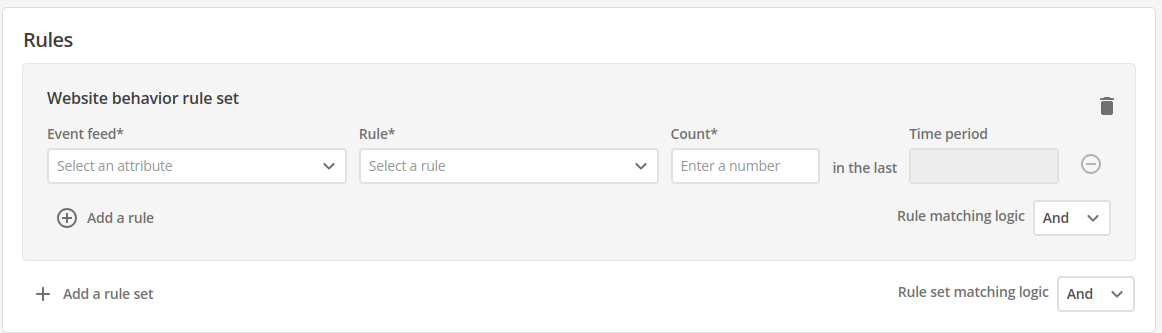
Locate the Rules section of the segment.
-
Select an Event feed from the drop-down menu. Only consent-required event feeds are listed.
-
Choose a Rule operator to apply to the feed:
-
Less than
-
Less than or equal
-
Greater than
-
Greater than or equal
-
Equals
-
Does not equal.
The time period is passed through from the event feed and can not be changed in the rules. Configure the time period when you create the event feed.
-
-
Set the count for the number of occurrences of the selected event feed.
-
If your segment requires more than one rule, click Add a rule to add as many as needed.
-
Verify that the Rule matching logic field is set appropriately for your segment. The options are
ANDandOR.
Consentless website behavior rules
Consentless website behavior rules evaluate event signals on the current request. They do not use a rolling count or time period. See Consentless website behavior event feed for feed setup.
To set up a consentless website behavior rule:
-
Locate the Rules section of the segment.
-
Select an Event feed from the drop-down menu. Only consentless event feeds are listed.
-
The Rule operator is Equals.
-
Set the value to True.
-
If your segment requires more than one rule, click Add a rule to add as many as needed.
-
Verify that the Rule matching logic field is set appropriately for your segment. The options are
ANDandOR.
| Consent required | Consentless |
|---|---|
Event feed list shows consent-required feeds only |
Event feed list shows consentless feeds only |
Operators include less than, greater than, equals, and does not equal |
Operator is Equals only |
Count and time period from the event feed |
Value is True (evaluates on the current request) |
For feed configuration differences between consent types, see Consent-required vs consentless page view feeds.
You can return to finalizing the settings in the single segment or exclusive segment.