Consentless website behavior event feed
Consentless website behavior event feeds use event signals that do not identify users and are not stored. Best for real-time request-based personalization such as on-page content and CTA optimization.
For an overview of how consentless feeds differ from consent-required feeds, see Consent-required vs consentless page view feeds. For the consent-required alternative, see Website behavior event feed.
Create a consentless website behavior event feed
To set up a consentless website behavior event feed:
-
Log in to your Squiz DXP instance.
-
Click the Customer data platform button.
-
From the left-hand navigation select Event feeds.
-
Click the Create Event feed menu button.
If no other Event feeds exist, the button presents near the centre of the Event feeds page.
If other Event feeds are extant, the button presents in the top-right corner of the Event feeds page.
-
Select from the create menu.
This opens the Create consentless website behavior event feed page. Uses event signals that do not identify users and are not stored. Best for real-time request-based personalization such as on-page content and CTA optimization.
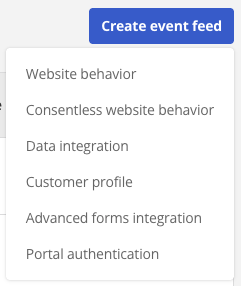 Figure 1. Create event feed menu
Configure event feed details
On the Create consentless website behavior event feed page, configure the details for the page view event.
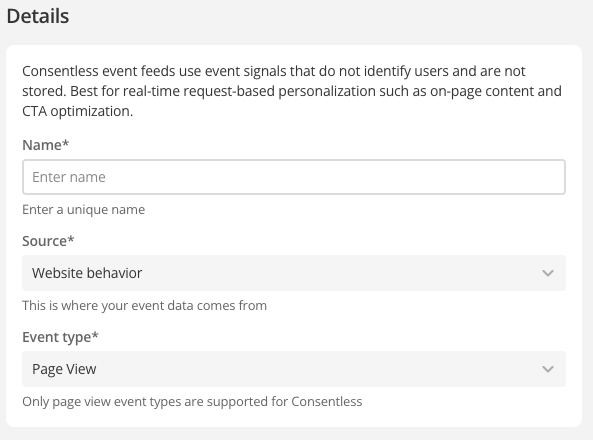
- Name
-
Enter a descriptive, memorable, and unique name for the event feed.
Generic or general names are not recommended.
- Source
-
Automatically set to Website behavior.
- Event type
-
Automatically set to Page view.
Only page view event types are supported for consentless event feeds.
Set the page view event feed attribute filters
Page view event feed attribute filters allow the event feed to trigger against the following attribute types.
-
Device type
-
URL - Domain
-
URL - Path
-
URL - Query string
-
Referrer - Domain
-
Referrer - Path
-
Referrer - Query string
-
Language
-
Location - City
-
Location - Continent
-
Location - Country
-
Location - Region
-
Location - Region code
|
Interest - Tags is not supported for consentless website behavior event feeds. For consent-required page view feeds that support Interest - Tags, see Interest - Tags. |
For attribute filter operators and location value formats, see Set the page view event feed attribute filters.
Setting multiple attribute filters
Multiple filters can be set for a given event feed, and the matching logic across multiple filters can be either AND or OR.
|
The rule matching logic applies across all attribute filters set for a given feed. That is, the matching logic allows for two different rule matching states.
|
Create the event feed
-
Click the Create event feed button.
A Changes saved alert presents towards the top-right of the screen, and the Event feeds page reloads with the new event listed.
-
Alternatively, click the Cancel button to return to the Event feeds page without saving any of the entered details (and, if applicable, without saving any of the Attribute filters).
Next steps
After creating the feed, use it in a consentless segment. See Consentless website behavior rules.